The Phantom 2 Vision is a fine machine. but the documentation can be sparse in places, and hard to track down. Consequently there is a feature of the machine which you may never have heard about, but which gives you so many more flying options; or you may have heard about it but can either not find out how to enable it, or are keeping away because DJI tells you it is for advanced fliers only. Nonsense; it’s called the NAZA mode and your flights will be more pleasurable and safer if you have it enabled.
First I will tell you what it does; then if you like the sound of what it can do, I will tell you how to enable it.
By default your Phantom is set in Vision 2 mode. In this mode, the two shiny switches on top of the transmitter serve no purpose (apart from the right hand one which you frantically toggle as if attempting to bring it to orgasm in order to initiate the compass calibration mode). So when you fly, it doesn’t matter what position the switches are in.
In NAZA mode, these 3 position switches offer a number of functions; with “normal” flight being achieved with both switched in the up position. And this is why DJI says that this mode is not for beginners; because apparently beginners are not capable of checking that the switches are up before flying. Assuming you have the intellect to ensure that the switches are in the upright position before flying, then NAZA mode may be for you.
So, switches up and start to fly, and the Phantom will fly exactly the same in NAZA mode as it did in Vision 2 mode.
Now let’s play with the switches, starting with right hand side (S1). In the default top position you are flying in GPS mode, meaning that the Phantom will attempt to maintain the same position in space when you take your hands off the stick. Move the switch to the middle position and you are now flying in Attitude mode, or Atti for short (or A if you are really trying to abbreviate to the maximum [or max, or M]). In this mode, your Phantom will attempt to maintain height and direction by means of the barometer and compass; but GPS is switched off; so your craft will drift with the wind (if there is no wind at all, you probably won’t notice any difference).
Why would you want to use this? Maybe you have been flying upwind. For an easy return, flip it into Attitude mode and let it drift back to you. Wind direction permitting, it can also be useful for smooth video. Fly upwind, start your video, and then turn on Attitude mode and let the video run as your Phantom is born along on the wind.
The bottom position of S1 initiates the Return To Home (RTH) procedure; whereby your Phantom climbs to 20 metres if it is lower than that, flies back to the starting point and then gently lands at your feet to the applause of admiring onlookers. Normally, RTH switches on when you have lost contact with your Phantom; but there are times when you may want to initiate it even though you have a connection. The first is to impress those onlookers (I have been guilty of that); and the second maybe when you have had enough flying and just want to let your Phantom come home on its own. The problem is that in Vision 2 mode, the only way you can trigger RTH is to turn off the transmitter. This is all well and good if your Phantom does then return to home and land; but if it decides to bugger off instead, there is nothing you can do to reconnect; and you will left looking like a fool in front of an expectant crowd.
In NAZA mode, the bottom position of S1 will initiate RTH, but you can regain control by flicking up the switch at any time. Much better.
On the left we can find S2, home of the Intelligent Orientation Control (IOC) functions. In the up position (or in Vision 2 mode), IOC is off. And there you are, your Phantom a zillion metres high and a zillion metres away; and you want to bring it home. To do that, you need to know where the front of the craft is pointed so you can bring it back towards you. Unfortunately, given the shape of the thing, it can be impossible to know which is the front just by looking at it, especially from a zillion metres away. So you have to squint at the display on the phone to work out orientation (assuming you haven’t lost WiFi contact) and then mentally calculate which stick to throw to bring it back; by which time the batteries have died and it has landed in a swamp.
Hello S2! Flick the switch to the bottom position and you are now in Home Lock mode. Then pull back on the right hand stick and the Phantom will return to its starting point, irrespective of the direction in which it is pointed. I find this massively useful. Whenever I have finished with a flight, I turn on Home Lock and just bring it home; so easy.
The middle position is less obviously useful. It’s called Course Lock and when it is enabled, the Phantom will respond to the sticks as if it is aligned in the direction it was facing at time of take off. So if your Phantom was facing East when you took off and is now pointing North, pushing the right stick forward will send it north. Flick onto Course Lock and pushing the stick will send it East. No, I can’t think of a use for it either.
Still, access to Attitude, RTH and Home Lock modes is worth having, so how do you switch to NAZA mode?
Connect your Phantom to your computer and turn it on. Start up the Assistant software and on the top right hand side you will see a button set to Vision 2 mode. Click on it to change to NAZA mode.

Next, select basic mode and as you flick S1 you will see the options change in the control mode switch. In the down position you will see you have selectable choices.

Make sure you have selected Failsafe; which triggers the Return To Home mode. Another option is Manual, which removes all the limits of the flight system and allows advanced pilots to perform rolls and other aerobatics, and pilots like me to convert my Phantom to a pile of plastic in a couple of seconds. You probably don’t want to try Manual mode.
Turn off the Assistant software and turn off and disconnect the Phantom. You are now all set to use NAZA mode. Just remember to check your switch positions before turning on your Phantom.
UPDATE: In response to some of the comments to this post; here are some clarifications/additional info:
“Failsafe” and “Return To Home (RTH)” are the same feature. I have used both terms because both seem to be in common use; but they mean the same thing; when enabled your Phantom will return and land a the home point; provided it has been set.
You can change the home point by moving the S2 switch to the lower position and back, five times. Your lights will flash green to confirm. This works in NAZA or ordinary mode. There is a good post on this subject here.
The light sequences are different for the two modes:
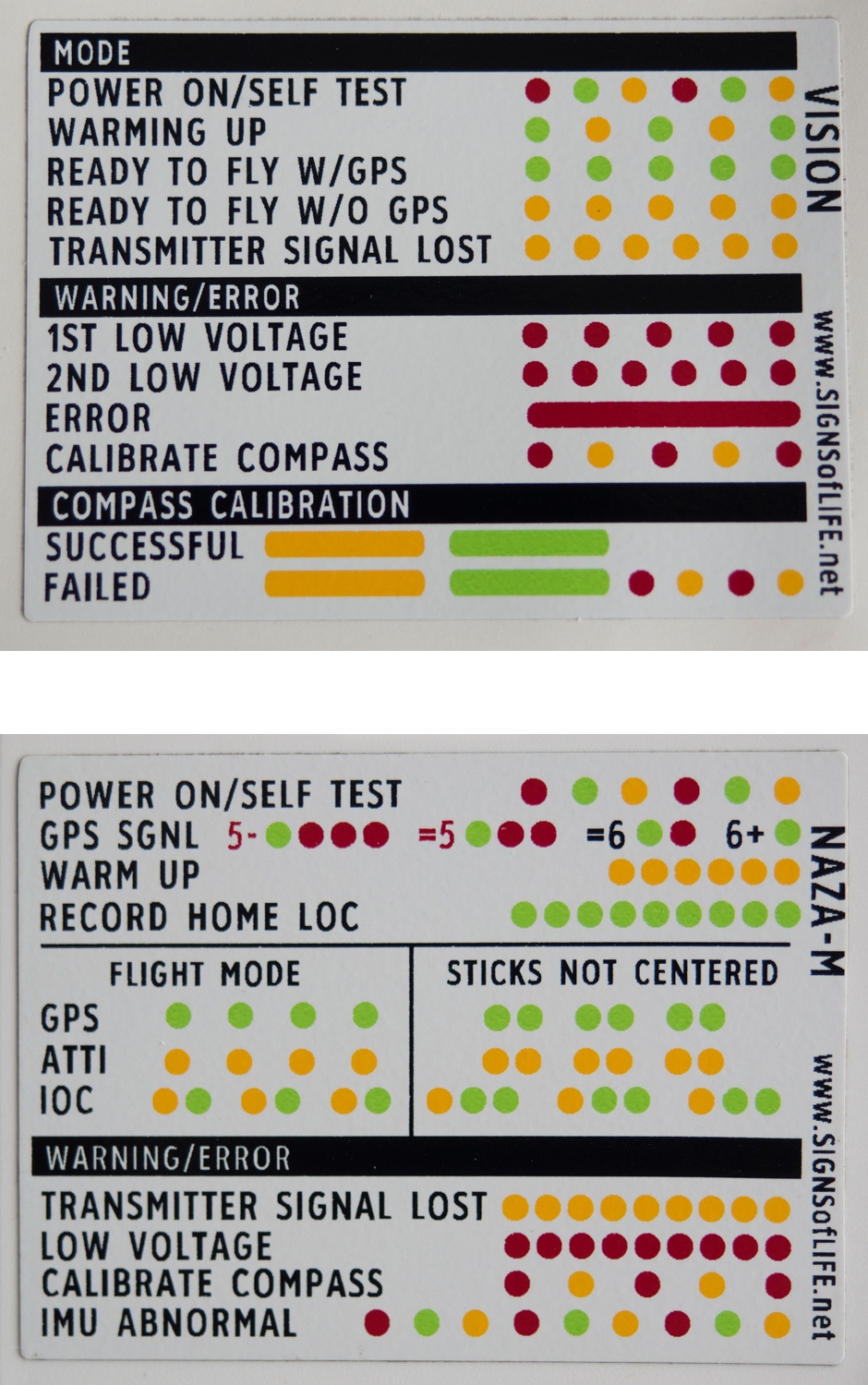
Note: The above are part of a very useful sticker set which you can obtain here.
Comments 🔗
2014-04-09| **** saysGreat explanation of NAZA mode, thank you.
2014-04-10| Spike saysMost welcome.
2014-04-13| **** saysFantastic. Bravo! Just what I needed to know. Malcolm Messiter
2014-04-22| DCLocal saysThank you, this is a great explanation and very helpful.
2014-04-23| Casey saysVery Useful - thank you!
2014-04-25| **** saysi am assuming most, if not all of this applies to the Vision+ as well, correct?
2014-04-26| Spike saysDon’t know. Don’t have a Vision+ and I am staying away from the latest firmware update. But my guess would be: yes.
2014-04-28| **** saysExcellent. Enjoy your writing style too!.
2014-04-29| **** saysThanks, you should offer your skill to explain thing, to DJI documentation department ;D
2014-04-29| Spike saysThanks for all the comments; glad people are finding it useful.
2014-04-30| **** saysthanks! this is the only explanation that makes sense to me so far. But… one question. I thought I read someplace that one can reset the “home” position by flipping S2 a few times or something like that? Is that true?
And, 2 comments. I believe you use the terms “return to home” and “failsafe” interchangeably here, but for very new Phantom users, it’s kind of confusing. Just be sure it’s explicit.
And, the course lock feature will be very useful for doing long, straight “dolly” shots, as it will hold a much straighter course than you can if there is any wind, especially a cross wind.
thanks again for posting this. really helpful and convinced me to try Naza. Doug
2014-05-01| Martijn saysHere’s a use for Course Lock (as you couldn’t think of one): suppose you want to fly past a nice church tower, keeping it in view all the time. With course lock, you can rotate (yaw) your Phantom to track the tower as you fly towards it, past it and then onwards. In other words, you’d keep flying forwards even after having passed the tower and now flying away from it. Without course lock, you’d now be flying backwards. That’s quite hard to do. Course Locks makes this shot easy for you.
Great article by the way, the Phantom is great but articles like this are a must to get started and to grow in this hobby.
2014-05-09| Reza saysHow do you calibrate campus when you are in Naza mode?
2014-05-09| **** saysSame as Vision mode: flip the S1 (righthand) switch up/down 5 times.
2014-05-09| Spike saysGood example; although we are short of church towers here in Thailand!
2014-05-09| Spike saysYes, you can reset the home point by flipping S2. This changes the home location but not the height. So you could change the home point when the drone was 10 metres up in the air and it would still return to that vertical point and then descend until it found ground.
2014-05-09| irwin saysJust what I needed to know. Thanks…
2014-05-10| Reza saysIs there any YouTube video available showing this procedure?
2014-05-10| Spike saysProbably; do a search.
2014-05-11| Bob saysHere’s one.
https://www.youtube.com/watch?v=695FLzWT_ko&list=FLsFk4rwaWOB1N1CUDewKmSA&index=2
2014-05-15| Dave saysThis is all great info, but I think you should also point out that in NAZA mode, the status lights are different than in “regular” Phantom mode. Might really throw some people off if they just switch to NAZA without knowing that.
2014-05-16| **** saysHow do the lights differ in this mode? Guess I’ll find out soon enough… my Vision+ shipped yesterday from B&H
2014-05-17| anomac saysVideo isn’t working. Well not here in Bali. Damn!
2014-05-17| Spike saysI humbly suggest that a video is not required and the instructions above should be sufficient.
2014-05-17| Spike saysI have updated the post in response to some of the comments. Hope this helps.
2014-05-18| JWR saysCould you clarify changing Home Lock while in NAZA mode? Say, if take off from one position and then film a Wake Boarder and you then stop the boat and want to set a new Home Point, do you bring the Phantom over he new position and then move the S2 switch up and down 5 times?
2014-05-19| Madison Snow saysLove the way you write, learned a lot about NAZA mode, thank you!
2014-05-19| Spike saysThat is my understanding of how it works; and you should get a green flash confirming that the home position has been changed.
2014-05-19| Spike saysWelcome; and good luck in your motorsports career.
2014-05-19| **** saysGood info. You may (or may not) want to include in the writeup something that is often left out of Naza related manuals/instructions: The fact that going to NAZA mode will now provide not just one CSC mode, but 4. (why there NEEDS to be 4 CSC methods is beyond me). This 4 may be convenient for some, for others it may increase the risk of an accidental mid-air engine shutdown by about 400%.
2014-05-21| ErtcT saysI’m not sure I understand what you meant by “NAZA mode will now provide not just one CSC mode, but 4”. Would you please expand on your point? Thanks.
2014-05-23| Ryan saysGreat post. Extremely helpful. Liking NAZA mode. Just wondering about the S2 switch and what needs to be done to set that up properly. When I push it all the way down and pull back on the controller it does not go into “home lock” mode. What am I missing? Thanks again!
2014-05-23| ErtcT saysI believe you have to be 20 feet or more away from the Phantom for home lock to activate.
2014-05-25| Josh Anon – Naza Mode and the Phantom 2 says[…] manual!) and extra controls that you can enable by switching from the simple mode to Naza mode. This blog post does a great job describing Naza mode and how to switch to it. In short, Naza mode enables you to […]
2014-05-25| Renė saysGreat post. I have the vision+ three days and today I switch to NASA mode thanks to your manuel. Thanks For it..
2014-06-01| www.abbeyfieldfilms.co.uk saysThis is really helpful. Thank you. I was warned not to fly in this mode because if I lost contact with my Phantom it would fly away. Is this true? Out of curiosity those of you in lovely places like Bali or Thailand are there any regs out there for commercial work yet? I have just sat my BNUC-S exam here in the UK prior to applying for a Permission to Work from the CAA. Thanks again - more like this would be brilliant!
2014-06-02| Adam Butler saysWhat a great article. I am new to the vision and have spent all day looking for an article just like yours. Now I can have a beer after i have my first Naza M flight.. By the way I am in Thailand as well, Koh Lanta near Krabi. If you are down come and visit.
2014-06-02| Spike saysI think the answer is the opposite. If you lose visual connection with your Phantom you can initiate Home Lock and bring it back without worrying about the direction it is pointing, and if you seem to be losing all contact, turn on the Return To Home and hope for the best! NAZA mode gives you more options without taking away anything. I am not aware of any restrictions in Thailand, and many laws we have here are just ignored anyway!
2014-06-02| Spike saysYou have nice beaches! Will look you up if I ever come. I took a couple of shots yesterday: 2014_06_a-long-way-home
2014-06-03| **** saysI have read a loy about this kit and was told by DJI that for the use we needed it for that requires waypoints that the Phantom 2 Vision was the one to buy, only to learn that you needed various other parts and a new iPad! But, it still didn’t work! Then after various communications with DJI learn that the ground station is not avaiable yet, butvit will only be a few weeks! That was a couple of months ago! I will explore the Naza mode now it is clearer, for this I thank you… Do you have any idea or expirience with the ground station yet or any clue when it may be released as you seem to know more about the DJI products than they do!?
2014-06-03| Andrew Halse saysSorry, a lot!
2014-06-04| luke saysHello, thank you for this! I have had a Phantom 2 Vision+ for less than a week, and I LOVE it, that is until it decided to pull a HAL9000 today and no longer allowed me to control the vehicle as I hopelessly watched it crash. Thankfully, it recovered, but I was obviously shaken by the unit suddenly developing a mind of it’s own. In searching for a cause (and solution) I came across your article.
My question: Do you know if flying in Naza mode will make the copter LESS likely to develop a mind of it’s own? Do you have any insight into what could have caused this? Thank you.
2014-06-04| Spike saysI ground station functionality has been promised for a long time. Now the Plus is out, I suspect we may never see it.
2014-06-04| Spike saysSorry for your loss. There seems to be no one cause of flyaways. All you can do is to make sure your batteries are charged, your compass is calibrated; and then fly the thing low and run a check that the home position has been properly captured and the machine is stable in the air. But if an internal component fails, you are still screwed. I don’t think NAZA will reduce the chance of a flyaway or a sudden crash; but Home Lock can be a life saver if you start to lose contact and are unsure of where your Phantom is pointing.
2014-06-09| Maiaibing saysThanks for the write up which helped me when I made the shift to IOC. Course lock is actually massively useful. I use it every time I fly. What it does is to lay out everything as a giant grid you can according to. If you have a map (mental or physical) of the area you what to hover around far away without visual confirmation AND you want to ensure the camera is not spinning as you glide course lock is just the thing you need. I use it to glide along streets, beaches, paths etc. Also in Home lock going left or right will move the Phantom in a circle around your Home Point. So if you want to take a shot around something (a building, statue etc.) its really easy to just enter Home lock and pull left or right, and you will make a perfect round-about shot of your theme.
2014-06-11| Ele-Mental saysI was wondering what happens when you lose the connection between your remote controller and your Phantom in Naza mode. Does it automatically return to home (like in Vision mode)? Or does it need to get the S1 switch down command for the failsafe/RTH to kick in? Since the connection to the controller is lost at that point, I can’t see how the Phantom could register that command. Could someone please clarify this for me? Thank you.
2014-06-11| Luke saysMy understanding is that the device will still return to home should a connection be lost , even in NAza m mode. I have not confirmed this first hand but the “fail safe” function is still active even in NAza m.
2014-06-11| Spike saysThe failsafe “return to home” works the same in NAZA mode; the only difference is that you can trigger it deliberately by flicking the S1 switch. In Vision mode you can only trigger it deliberately by turning off the transmitter; which is not a good idea!
2014-06-11| **** saysJust one question for RTH? if I go to a field and fly, should I set this before RTH point to Phantom knew where to return. If I go to another location, should I again set the RTH point before fly on that second location that Phantom would not have gone the previous location?
2014-06-12| Spike saysYes! If you allow your Phantom some time before you launch, it will set a new home point. It indicates this by a long green flash. I can’t see the lights under the Phantom during warm-up (very bright here in Thailand); so I always check that home lock is set by the following method:
Allow time for warm-up and ensure at least 6 satellites locked before take off. Take off and check you have flashing green lights at the rear. Fly the Phantom a reasonable distance away. Yaw the Phantom such that the rear of the Phantom is not pointing towards you. Flick S2 to RTH and pull back on the right stick. Your Phantom should fly towards you, rather than flying backwards. This confirms your home point has been locked.
2014-06-12| **** saysHow to set new RTH point? Flip up-down left stick 5 times and wait? Is that method? This what you write is to check that RTH working properly? And in NAZA mode when i flip right stick to down I will turn on RTH? Can I continue every moment when I return right stick on ATTI or GPS mode and fly normaly?
2014-06-12| **** saysI have Phantom 2 Vision PLUS, is everything the same in up text like your Vision?
2014-06-12| Spike saysWhat I described is what I do to ensure RTH has been set properly at initial take-off. You are correct that you can reset the RTH point by flicking the left switch; but I have never used that. If you turn on RTH with the right switch in NAZA mode, you can turn off RTH by returning the switch to GPS or ATTI position. This can be useful if you want to use RTH to get the drone close to the landing point, and then turn it off to make the final landing under your own control.
2014-06-12| Spike saysI’m sorry, I don’t know.
2014-06-12| luke saysYes, I have the Phantom 2 Vision + and everything is the same as Spike described above.
2014-06-12| **** saysOK…thank you so much for both explanation…
2014-06-15| Darrin Rapoport saysExcellent explanation. thank you so much!!,
2014-06-16| decisionking.com saysDude! You have succinctly explained to me in one page the information I have been hunting for all over the Internet, message boards, and instruction manuals - since Dec 2013! Also, you have a great style of writing. Thank you and cheers!
2014-06-16| Eamonn Quigley saysAfter a particularly HEAVY
2014-06-19| adambrackman saysGreat info here. I enabled NAZA and S1 was working as described, but S2 was not. I messed around in the software module (DJI assistant) and under “advanced” > “IOC” tab, I had to check a box titled “Intelligent orientation control”. Seems this is what I had to do to get the S2 options working. Thanks!
After taking it out on a test flight, I am having some challenges with the home lock command. It will go back to home when i point the stick down, but when I take the stick to the right to try to make perfect circles around “home”, it seems to drift significantly away from home point. I am holding the stick perfectly, to the right and not slightly up or down, though I noticed if I give it a decent amount of down command while holding to the right, it would decrease the distance from the home point. Lastly, I had trouble resetting the home point. Its 5 full flick up and down of s2 right? Whats the tolerance here for speed of the flicking? It took like 10-15 flicks to finally get it to reset. Any advice on that? again, thanks.
2014-06-19| adambrackman saysThis video helped a bit. https://www.youtube.com/watch?v=IYYVyRVGE-8
2014-06-19| roltonen saysThanks. This is missing in the manual. In denmark under examination flight, you have to set it in manual mode and fly. Which makes no sense, in my opinion.
2014-06-20| Andy saysI think the Vision+ may be slightly different. Both of the switches do have functions in the default ‘Phantom 2" flying mode from the factory.
The S1 switch (top right) will allow you to regain control after “Return to Home” begins by flipping the switch to the middle or down position and leaving it there. I have tested this myself and it works.
The S2 switch (top left) when flipped up and down at least 5 times fast, will set a new “Home” position. If the Phantom is close enough, you will see the green LEDs flash quickly to show that a new home point has been recorded.
I’m on the latest firmware and latest DJI Vision app with no problems. Been having a blast the past two weeks, mostly flying over water. :)
2014-06-21| ProfessorStein saysThe best use of course lock that I’ve seen is if you’re trying to capture track & field events or automobile sprints (or anything else that runs in a straight line). “Lock” the course to run parallel to the track and then you can rotate your Phantom 90 degrees to face the action, but still fly to and fro along the course with no worries (especially of drifting into the lane and taking someone’s head off with your rotors) and concentrate on keeping the action in camera frame.
By the way… LOVE your explanations and writing. It’s exactly what I was hoping to read in the manual(s)… but it was never this clear. Thank you!
2014-06-22| Samir Rai saysAs said by many commenters on this article, once again, let me also massively thank you for such an awesome post. Great job.
And, i have a problem, wonder if anyone could help. I managed to crash my vision plus n break one ESC, looked online but only got spare for vision version, seemed everything same so ordered and i replaced with the broken one by myself.
When started it worked fine, but the startup tone of my vision plus has changed to that of vision now, meaning, vision plus is only supposed to make that startup tone n no follow-up four chimes, but after installing one older generation esc, it now does that four chimes like previous version vision. Also flicking that S1 is not setting up new home button anymore (i remember it used to before). But s1 switch works (could tell by calibrating screen).
And on naza mode, when started up, at one point, only one ESC’s LED(i think its that changed one) flashes red at one point…
2014-06-22| Steve saysLike everyone else, I am more than grateful for your post and the subsequent discussion. My question is whether the camera can still be operated when the RTH function is initiated by the pilot in NAZA mode. I assume it cannot if it is initiated because of loss of contact. What I would like is to be able to use RTH to function like a single waystation. My Vision Plus has just arrived and is still unboxed. I will be videoing a 10 minute event in 2 months, which gives me time to learn to fly, but I will also need to be doing other things once the event starts. I’d like to get the copter to hover on one side of the event, then be able to hand the controller to someone who will have only a few days flying experience. He could initiate RTH and focus on the camera as the copter passes over the event on its way home - if, that is, the camera still can be controlled. (Risky?) Should I be thinking instead of ordering a Phantom 2 with GoPro, video downlink, iOSD mini, a datalink and the ground station app. That seems a lot more complicated and expensive if I only need one way station, but I’d be willing. Thanks for any thoughts on this.
2014-06-23| brian saysSpike. Your post was invaluable. Thanks very much. I’ve read dozens of blogs on the Phanton and watched dozens of youtube videos and I’ve never come across information so helpful. I had no idea (and I’m sure I read the instructions carefully) that the IOC was inoperable “out of the box.” It actually could have been a disaster because in one of my first 5 or 6 flights my Phantom 2 got too far away so I switched on Home Lock (or so I thought) just like the instructions and many youtube videos told me. to don But for some reason (and thanks to you I now know the reason) it kept going further away. I was eventually able to recovery it. On my next flight I tried to get homelock and ATTI to work and found that none of the switches were working. I searched the net for a solution and come to you post. Thank you, thank you, thank you!!!! DJI should include a clear warning that Homelock will not work until people follow your instructions.
2014-06-23| Mohammed sayshello.
thank you from the post, very easy to understand, if you have youtube account.. please let me know,
I have a question: If I switched my phantom to the NAZA mode, is it possible to switch it back to the phantom mode ?
2014-06-24| Steve saysLooking more carefully, maiaibing had answered my question about being able to shoot video once RTH is initiated by the pilot in NAZA mode… the answer being “yes”. Again, thanks for a great post!
2014-06-25| David F saysHilarious post! Reseting my compass will never be the same again.
2014-06-29| Judson Crossland saysI assume this will work the same for the Phantom 2 with the gopro set up (H3-3D gimbal)
2014-06-30| **** saysTHANK YOU! I had a bad crash recently and was so convinced that I was the victim of a flyaway, that I was afraid to fly the thing again. But after reading this post, I feel I know more about the Phantom than the manual itself had taught me. Thank you for giving me the control back! Seriously, DJI, with all their sleek packaging, should really rethink how their manual reads.
2014-07-04| **** saysThanks very helpful.
2014-07-06| **** saysThanks for the tips and the laughs
2014-07-07| itsaz saysYou might want to add that after switching to NAZA, you must also select the ADVANCED tab and place a checkmark in the IOC box. Without this step, the S2 switch won’t do squat
2014-07-07| Harry M Lewin saysA lucid and easy to follow presentation. Thanks. One small point:Home Lock requires GPS, which may not be available. But Course Lock merely requires the compass function. Course Lock is useful if you want to scan the water while you fly over the coast line. Ideally you would use a gimbal but many of us do not have one. Harry
2014-07-12| Vincent saysI have switched my vision2 to Naza mode. I took the unit outside to calibrate it. I first turn on the transmitter and then the machine. I flipped the S1 switch back and forth until I had a steady yellow light on the Vision 2. I rotated the unit clock wise 360 % and got my green light. Then I rotated 360% nose down and get a set of flashing green lights and then a set off flashing red. Is this normal in Naza mode? I have been looking for a video of someone calibrating it Naza mode to confirm the led light sequences but have not found any. I would appreciate any help. Vinnie
2014-07-21| **** saysVinnie, Mine did the same. I think it indicates it is going through warm up procedure and seeking satellites. Flashing red means the calibration didn’t work.
2014-07-21| Thomas saysCompass calibration should be exactly the same no matter the mode. It sounds like it got through the compass calibration okay… but the set of red lights usually indicates that you have less than 5 useful satellites to lock onto.
2014-07-22| **** saysThanks for your help I will keep trying.
2014-07-22| **** saysJust saw your reply and tested the calibration process with my son. Controller on, DJI on, wifi and phone app all working. He took the S1 one and switched back and forth till we had a solid yellow light. At this point I asked him to make sure and watch and let me know how many satellites are locked in while I calibrate. Rotate it clockwise 360 % and get a standing green light and he lets me know 7 to 9 satellites so far. I put it nose down and start to spin her 360% clockwise and my son tells me you have 1-3-5-4 during this. I get a green light and a couple of red flashing lights. I place it down and its flashing green now with no red and have 9 satellites. I guess that explains it. Thank you both for the help.
2014-07-25| Eugene saysThanks for this useful post. Now it’s understandable for me what each mode of S1/S2 switches does. Now I finally can use IOC and RTH features…
2014-07-25| Eugene saysOh! That’s important and useful comment. Thanks!
2014-07-26| **** saysexcellent post! a must read for all goofs trying to get the point of NAZA mode from the manual. and i lol’d a lot :)
2014-07-26| Rene saysGreat post! Specially: frantically toggle as if attempting to bring it to orgasm in order to initiate the compass calibration mode
hahaha
2014-07-27| zITA saysIn my Vision 2 Phantom + app I knew I didn’t have it set up correctly until the “IOC Control: said ON” You have to be in NAZA mode, ignore the unnecessary warnings in that step! Go to Advanced, select IOC, then check the box. Sheesh. While I was at it I went back to the BASIC tab and set S1 position 3 to FAILSAFE (from the default of manual). Much safer for this noobie. I doubt I’d ever need MANUAL anyway.
2014-07-27| **** saysthis is a very nice, well explained article … sorry it is not longer on some other P2V features … clearly, this person is either a consultant or a teacher … (I recognize the writing talent …)
2014-07-28| Dan saysYour help is very much appreciated nice and clear also
2014-07-30| **** saysYou really need to update the description to explain how to enable the S2 switch. I followed your directions and found that my S2 switch was not working. Then I happened to read the comments and found that itsaz had posted a comment on July 7 that helped me finish the set-up job!
2014-08-07| anne and nick saysjust got my phantom yesterday and thanks for a well written and very clear intro to naza
2014-08-10| **** says“The middle position is less obviously useful. It’s called Course Lock and when it is enabled, the Phantom will respond to the sticks as if it is aligned in the direction it was facing at time of take off. So if your Phantom was facing East when you took off and is now pointing North, pushing the right stick forward will send it north. Flick onto Course Lock and pushing the stick will send it East. No, I can’t think of a use for it either.”
If you are a filmmaker, it’s immensely useful. For example, following alongside a motorcycle and, as you overtake it, you want to pan the camera to keep it in frame. I use it all the time for this sort of thing.
2014-08-10| **** saysTHANK YO MUCH SO FOR UNCOVERING THE OBVIOUSLY STUPID SECRET - SERIOUSLY!!!
2014-08-14| **** saysWith caps lock on, not sure if you actually mean that or are being sarcastic.
2014-08-15| bojstrup saysSuper and fun description. But I’m having problems getting the IOC enabled - anyone have any idea why ? Selecting the IOC under the Advanced tab gets disabled everytime I leave the tab.. please help :)
2014-08-20| Robert Daubar saysWithout a doubt one of the best descriptions and explanation of NAZA mode and the IOC controls. I share this page constantly! Thanks so much for putting this together, it’s been a great tool for so many flyers!
2014-08-23| Tommy Molnar saysI had no interest in moving into the ‘high-tech’ NAZA mode - until I read THIS! Now I can see why it is one of most highly touted attributes of the Phantom. Too bad you don’t see anything about it in the manual. I got my Phantom back in Feb (2014) and would have liked to ‘stumble’ on this earlier. Not only is this post informative, it injects just the right amount of humor to keep you from getting bogged down in the technicals.
2014-08-23| Grant says
- You can change the home point by moving the S2 switch to the lower position and back, five times. Your lights will flash green to confirm. This works in NAZA or ordinary mode. There is a good post on this subject here.
Are you sure this is S2 and not S1
2014-08-27| **** saysCourse lock can be useful tracking runners on a 100m track. The craft will fly in a straight line whilst yawning to frame the action…
2014-08-28| W saysYour posts are hilarious. Thanks for adding some enjoyment to an instruction manual. Props.
2014-09-09| **** saysThis post has convinced me ….Naza here I come
2014-09-11| Andy - Pattaya Hotels for solo saysGreat post! Specially: frantically toggle as if attempting to bring it to orgasm in order to initiate the compass calibration mode hahaha
2014-09-11| bond101 saysThanks man, great post ! From brasil….
2014-09-16| **** saysI read some comments you gotta be stupid to lose control of this copter the first flight.
2014-09-17| **** saysGreat job-thank you…
2014-09-25| baptistou saysHello, Is there a way to take back the control of the phantom 2 vision + after it has entered in failsafe mode? Even in Naza mode it seems that once the failsafe has been triggered, either by a loss of radio signal or by the app on the iphone, it is impossible to take back the control of the drone, even by flipping S1 back to top or middle position. I had once the failsafe triggered by a low battery voltage, I said OK to return home on the app screen, but for some reason the drone came back about 20m away from its take off position (while I had 11 satellites before taking off). Its new landing position was just above a cliff, I had to extend my arm above cliff to catch it quickly, pretty scary! I now plan to use it from a vessel at anchorage under good weather conditions, but the vessel is likely to drift a few meters away during the flight so I must be able to take back the control of the drone before it lands in water ;-) Cheers
Baptistou
2014-09-28| Ben saysFlipping S1 up should do the trick like mentioned in the instructions “In NAZA mode, the bottom position of S1 will initiate RTH, but you can regain control by flicking up the switch at any time. Much better.”
Very useful instructions btw, switched, thanks for putting this together …
2014-09-29| **** saysTHANK YOU!!
2014-10-02| Andy saysWhat a fantastic article! You should have written the DJI WikI. Than you for explaining this in such a simplistic and easy to follow way :-)
2014-10-13| Catalin saysIs this tutorial valid for DJI 1.1.1 too ? Any difference ? Thank you
2014-10-20| **** saysDon"t know about page two and the bovine story but have to say you helped me tremendously, I read the DJI manual on S1 and S2 and not much there to read or understand, yours was concise and we will have to see about accurate but if your instructions are as good as your descriptions then piece of cake. One thing I would comment on I found a little confusing is the way you described the S2 switch and the course lock. There is a great description on another site and how they describe it is a grid, where home lock is more like a wheel with spokes and the center of the wheel always being home when you pull back the stick the course is like a grid, so as you say if you took off pointing east stick forward will always be east, back will be west, left will be north and right stick will be south (I think) and unless you are into flying squares I cannot think of a use either. Kenyon
2014-10-29| TO saysOne oddity I noticed: S2 set to Home Lock, S1 set to GPS (up) - go out, set S1 down (RTH) - drone returns, set S1 UP to regain control, but it is back in ‘Vision Mode’ even though S2 is still down. Toggle S2 up/down, no change. it remains in Vision Mode until I land and power-off.
2014-10-29| Naza mode on the Phantom 2 Vision| Toledo Aerial Media says[…] Original article can be found here. […]
2014-10-30| Pooria saystnx man for your great post, i have an issue and no one help me, sorry to write here but i think maybe you can help me. when i connect my remote to my mac, computer didnt recognize it. even the software didnt show anything when i move sticks, it seems it didnt know my controller. any advice?
2014-10-31| **** saysSo it SEEMS like S1 position 3 and S2 position 3 do very similar if not identical things/ Return home?
2014-11-02| Wendy belkin saysExcellent. Thank you so much. If S1 is in GPS position, does moving S2 from the off position to CL or HL override S1; or does S1 have to be in ATTI position for CL and HL? Thanks again, wendy
2014-11-02| Wendy belkin saysVideographers need course lock for imaging.
2014-11-05| dave bestpitch saysI am completely dense here…when you say plug in the phantom you mean the quad correct?
2014-11-09| Mike OBrien saysIncredibly helpful article - thank you. Question - is all of this the same for the Vision 2 Plus as well?
2014-11-14| scott1e2310Scotty saysI am currently using my Phantom 2 in NAZA mode but heading to Antarctica soon and was hoping to get some advice as I know their are a number of issues people have had operating in the Polar regions. I believe the main concern is the compass calibration because you are very close to magnetic north or south. I have read some people saying they can get a GPS lock but this has not been reliable. any suggestions on what mode and how to turn off the compass if possible. apologies if someone has covered this before in the forum. thanks Scotty
2014-12-04| IQBAL saysgreat job…thanks!
2014-12-12| **** says
2014-12-16| gideon schuman saysI have read so much stuff in the past that was so ambiguous. This was was so much more informative………. I feel a lot more comfortable in flying now………..Thanks
2014-12-24| Allan Grigo saysAt last. I’ve read the manual from back to front. Watched dozens of You Tube videos looking for information on NAZA. No luck until I stumbled across your post. I’m already to change to NAZA. Thanks a lot mate. Allan Grigo
2014-12-24| Allan Grigo saysHi Allan Grigo again Thanks again for your informative help with NAZA . Because you are so easy to understand, could you please give me a brief outline on how to bind a new transmitter with rechargeable batteries and the thumb control for the camera to my Phantom Vision 2 plus, and also bind the wifi extender to the same set up, Very much appreciate your help. Regards, Allan. Let me know any costs.
2014-12-24| Howard Leipzig saysGood job! My comment is that I believe Course Lock is very valuable and should not be dismissed as redundant or useless. If your Phantom is very high or very far, being able to see what direction it is pointing after a lot of maneuvering can lead to confusion as to which way to steer it (without resorting to a failsafe or other RTH mode). In CL, right stick turns it right, left turns it left regardless of which way the front of the Phantom is pointing! You can be constantly rotating the Phantom with the left stick and be moving in the direction you are holding the right stick. I fly in this mode a lot as it hones the skills to position the Phantom in many different ways while still knowing how to steer it around. Good work, Howard
2014-12-29| Jeffrey Fisher saysThanks, I referenced this website plenty of times!
2015-01-01| Clint Collins saysSo basically, if I have the right switch set to change from GPS to ATTI mode, then if my phantom began to perform the dreaded fly-away, I could just switch to ATTI mode and all control would regain, because in theory the only thing affecting the drone when it goes haywire flying off on its own is the GPS usually…??? Right???
2015-01-04| nazir saysExcellent. Just one question i have been researching zillions of times and find very confusing vids. How do you regain control in phantom mode when you lose connectivity and the bird flies back home remembering that both S1 and S2 were in up position. From the manual it indicates that u just flip S1 to the next position and u should regain control. Is this true
2015-01-04| JWR saysIf Phatom is NOT in NAZZI Mode you cannot regain control, it will go to HOME spot and land.
2015-01-04| Clint Collins saysCould you answer my question? The one above nazir?
2015-01-04| nazir saysThank you very much. But now I am concerned as all the experts advise on reading the manual thoroughly while the manual says otherwise in the section “Regaining control during failsafe procedure” please refer to the manual by DJI and advise if it is absolutely correct that one cannot regain control while in Phantom Mode.
2015-01-08| DonkDown – If You Don’t Have Your Phantom Vision 2 Plus in NAZA Mode You Are Doing It Wrong says[…] for whatever reasons. First off let’s realize it’s pretty early on in the drone game: This is easily the best explaination of what NAZA is and why it’s a no-brainier and very low r…. Big ups to this guy for putting this together. I feel that NAZA mode is a much safer flying mode […]
2015-01-09| John M saysI have successfully regained control of my Phantom 2 in Vision 2 mode after loss of controller signal by switching S1 from GPS to the next position, then back to GPS. Assuming the Phantom is in range and the controller has enough power it should take back control from the fly-home feature.
2015-01-12| Carlos saysyes you can regain control on phantom mode just flick the s1 switch to middle or down then up to gps, i have tried a million times.
2015-01-13| nazir saysThank u very much. Now i am comfortable to go buy one. It is amazing how many people are unaware of that and many reputable youtube videos also did not cover that and believed that it could not be done
2015-01-24| Kurt saysThank you so much for this article! You hear so much about flown away phantoms because users forget to record their new homepoint. And then to recover people try regaining control by flipping s1,while nowhere is it stated that out of the box the phantom can’t go into atti mode! I saw nazam mode while upgrading my firmware (before first use) and googled it.. Voila! It’s a shame this kind of info isn’t available on the quick start guide. This makes me much more confident flying in areas with bad gps reception (high rise buildings and such) or simple interference that can mess op the flight controller.
2015-01-27| Darin Kuntz saysBTW the course lock mode is perfect for fly bys when you need to focus on your camera work, ex paralleling a car or boat or runner biker…ect fly full bore away from you and use the rotate to get that ‘‘getting passed by a speeding hot rod, or to get that attack hello flyby…
2015-01-27| Drone saysYou did not find course lock very useful. Well it is! This is because course lock will use the compass instead of the gps. So in case you loose gps satellites (and you will), you still can use course lock. Home lock is useless in this! It saved me when it lost GPS lock and I was disoriented.
2015-01-29| » DJI Phantom 2 Vision+ Review says[…] The drone has multiple modes available, but by default, the beginner mode is active. This mode is more than adequate for most users, but experienced drone pilots may want more control. I found no mention of Advanced (Naza) mode in DJI’s support documentation. However, I did find a slightly dated, but still very, helpful explanation. […]
2015-02-01| Tommy saysFinally, after a year of relatively trouble free Phantom 2 Vision ownership, I can activate the NAZA mode with confidence. My only complaint Abput the Phantom in general is that I’m somewhat color deficient (not color blind, mind you) and if my wife is not with me (which is MOST of the time), I’m guessing at what color the flashing lights are. Since there are SO many combinations, I COULD get in trouble.
2015-02-06| Rowey saysWish I had read this great article before losing my Phantom 2 with full fpv setup in the ocean. I now know It could have been prevented.
2015-02-07| John saysGlad to note Tommy’s post. For those of us who are color blind, sometimes certain colors aren’t easily differentiated. It would be nice if colors clearly distinct to those of us with that problem. Something like red, white and blue wouldd work. If anyone ever has a way to do this, I’m in.
2015-02-07| Ryan saysGreat article! Thank you! What is the difference between flicking S2 all the way down and pulling back on the left trigger and flicking S1 all the way down. either way it seems like they would both return the craft back home?
2015-02-09| Eric saysHome lock returns the craft much much faster than simple RTH! it will save your batteries and save your craft.
2015-02-09| Giddyup saysAs I understand, and from experience: Return to Home - Phantom flies at calibrated height, (In my case, 30 metres to clear trees) Home Lock - comes to Home at the same height as when Home Lock is activated? ie: if it was at 10 metres, it will fly back at 10m until it reaches Home Point?
2015-02-09| Sean Cairns saysHave just purchased a Phantom 2 Vision (no flights as yet) and this has, without doubt, been the most useful educational material I have seen. THANK YOU!!! And, while I’m here, does anyone know if it’s possible to reverse the Mode 2 Up/Down Stick function…….reason is that I’ve done a lot of full size flying and the default function is counter-intuitive for me. Thanks again!!
2015-02-10| Michael saysI have a question that I’ve had difficulty determining an answer to online.
Let’s say you are flying in GPS mode and have received a Home Point. If you then switch it to ATTI mode (because you realizie you have a weak gps signal) and you were to lose contact with the controller…would the Phantom, in ATTI mode, automatically switch to GPS mode and “remember” the precious Home Point?
2015-02-10| Sean Cairns saysSolution found for stick reversal - thanks Marcus DJI Forum
2015-02-14| Geoffers saysI fly (NAZA) regularly from the top of a 1300ft hill in the Peak District, England. If I descend to say, 1000ft, get in a mess, (which I will do one day) and S1 to position 3 to get me out of it, what will happen? Will it climb only 60ft and then try to shave the top off the hill? Terrific to have found the Pattaya Days site….thanks!
2015-02-15| Spike saysMy understanding is that it will fly to 60 feet above the recorded home point and proceed from there. Try it and let us know…
2015-02-15| DrJohn40 saysSpike, I think the newest software allows you to change the height.
2015-02-15| Geoffers saysThanks Spike! Am still scratching my (very old) head about this one. I have always taken it for granted that the whizzo electronics in our fantastic Phantoms was, under normal circumstances, able to keep track of how high it was above Home datum. Just a bit uneasy however about assuming it always knows how far below Home datum it is……eg in my example, 300ft below and needing to climb 360ft before descending. A bit uneasy about just giving it a try, as our English National Parks Authority might be after me for “damaging their hill”. Thanks again to you and to Pattaya Days,
2015-02-22| Jonathan Rabinovitz saysThank you for this. I have read a lot and this is without doubt the most useful and informative article I have come across so far.
2015-02-23| Joseph Guercio saysJust ordered stickers from your LINK. This is a great Blog. Very informative. Better than the DJI manufacturer that’s for sure
2015-02-25| Portland Bill saysYes you’re right, it will fly vertically up til it gets to 20m (or whatever you set it to) above the home point and then return home.
2015-02-25| Portland Bill saysNext time you fly, drop down below the home point height and it should indicate height in negative numbers e.g. -11.4m. if it does, you then know that it’ll fly to +20M (or whatever you’ve set it to) before it attempts to RTH
2015-02-27| Geoffers saysThanks to Portland Bill for the suggestion….obvious now I think of it……..also interesting to contemplate how to set “negative” Ground Station Waypoint heights ie flying around a set of Waypoints at a lower altitude than the original Home. There seems to be no provision in the App for this. Lots off fun to be had anyway with just “normal” flying with the Phantom way below you….Thanks again…
2015-03-03| JP saysTry EnChroma glasses. They should let you differentiate the lights.
2015-03-18| jay cornish saysHi, and great read. is there a way to take my Phantom 2 about 500ft? i understand the software locks you out at 500ft but there has to be a way to go higher. suggestions? thanks in advance
2015-03-18| John saysJay, in the US, anything over 400 feet is in violation of FCC rules. I don’t think there is a built in limit on height, but just be aware of the legal risks.
2015-03-19| jay cornish saysi keep reading online there is a way to override it without GPS is ther eany truth to this? there has to be a way for it to go over 400ft.
2015-03-21| Tom saysHook phantom up to your PC and run the DJI Phantom 2 assistant software version 3.6 or higher. On the ADVANCED selection there are 3 tabs - Battery, Gimbal and Limits. Click the LIMITS tab - that’s where your Distance Limits are set – you can change max height to whatever you want, but if you set it higher than 400ft you will be warned and have to click OK.
PS - enter the height you want then press the ENTER key to save it
2015-03-21| nazir saysRemember if u have a phantom vision the remote itself has a limitation to approximately 350 to 400 metres. Not sure y you would want to set it more than that as the craft will merely lose signal from the remote beyond 350 to 400 meters and then initiate a return home anyway
2015-03-26| Dave saysThank you… finally someone to explain it… I have been search and searching how to get the drone into Naza-M mode and see this gadget one might have to buy to use Naza-M mode. And nowhere to explain how to set it up. The manuals on DJI are useless in discussing how to set up Naza-M mode. The Naza-M manuals only discuss how to use Naza-M mode.
2015-03-28| Don Givelos saysExtremely helpful. Many thanks, this is an extremely sophisticated machine and everyone should read all the manuals and go online for tutorials. I’ve crashed it a few times but not turned it into a heap of plastic yet.
2015-06-08| Vitit Kantabutra saysGreetings from Pocatello, ID (http://pbase.com/vkantabu/pocatello)! Thanks so much for posting this information. Hard to believe DJI itself doesn’t make this information easily accessible. I have a strange problem though – when I brought the S1 switch down all the way, the Phantom didn’t come home, at least not immediately. Instead, it drifted slowly to the right. After a while, I gave up and just put it back in GPS mode.
I am a Thai, and I knew the woman who developed Pattaya when I was a kid because her husband worked with my Dad. I am an Electrical Engineering/Computer Science professor and an amateur photographer. My photos are used by the City of Pocatello for their Web site banner.
2015-06-14| wormgrunter saysWow, this is a great site! Ok, I’ve owned my phantom for 6 months now, sounds like time to try NAZA mode! Question through, I was programming waypoints for an autonomous flight but the software wouldn’t let me change the altitude at the various waypoints, just kept all 4 points locked at default 98 feet, I was well within my flight circle but could get no response from the screen to adjust altitude that’s never happened before, can anyone help with this? Anyway will be trying naza due to the info from this forum! Thank you.
2015-06-29| will saysThank you very much this is the safe way. You were so right got scared of DJI warning. lol now. last week the bird was only 700 feet out 400 msl with visual then lost sight of it wifi went to. Dots are hard to see for older guys. This is the only way to fly. ? when I tested it I noticed one flaw I’m sure I did something wrong. set for home lock (so great). then I started fly home fail safe sw 1 bottom then recover from it but home lock is not working. by returning to gps then back to home lock everything was great again. Thanks again & again
2015-07-06| DCP700 saysJust set to Naza and tested flight - all good but cannot set the home point … Have I missed something in the initial set-up as S2 options seem not to have any effect at all.
2015-07-13| mg saysIs there a way to activate Failsafe (RTH) mode when you have S1 position 3 to manual mode?
2015-07-13| CAS says@mg Sure. Turn the transmitter off. It’s not recommended*, but that will for sure initiate failsafe mode and your bird will happily begin returning to home
- just… it’s 50/50 if you’ll be able to regain control again after doing so (in my experience)… whereas the S1 switch allows you to regain control every time.
2015-08-16| Robb G saysI tried connecting my drone to my PC, then running the app…but it never connects for me and when I press the Phantom button at the top right, it says connect to controller. Can somebody help me please